 a product of Micronetbd
a product of Micronetbd
a product of Micronetbd
mmeet.ai reads what is on your screen, arrives already briefed on your project, and chats with you live in the meeting. Smarter recaps, better follow-through, no transcript wading.
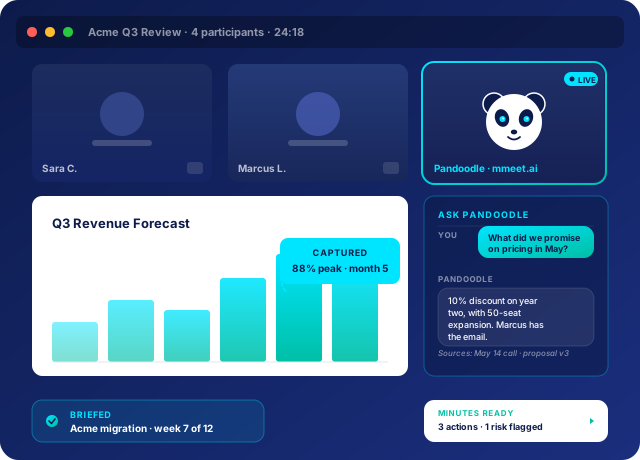
Slides, dashboards, contracts, code, charts, whiteboards. When something is shared on screen, mmeet.ai reads it. Numbers, headings, diagrams, and full text are captured alongside the conversation, so the recap reflects what was actually shown.
Before the call starts, mmeet.ai loads the project history, the open commitments from last time, the relevant stakeholders, and what was discussed at the previous meeting. So when someone says "like we agreed last quarter," it knows what they mean.
You do not need to wait for the recap. In the meeting, you can ask mmeet.ai about anything from your project history: past decisions, contract terms, prior commitments, who said what. It answers in real time, with citations, in the side panel.
Most meeting tools write a generic transcript summary. mmeet.ai writes minutes that connect what was just discussed to the entire project history: what changed, what was reaffirmed, what is now at risk, and what each commitment means in context.
Whether you run a deal pipeline, a client portfolio, a project, or a matter, mmeet.ai turns your meetings into closed loops.
Pipeline that updates itself. Stop losing deals to forgotten next steps.
Every client commitment captured. Renewals start with kept promises.
Task boards that stay in sync with what was actually agreed in the room.
Matter activity logged. Client commitments documented. Without the chase.
Cross-functional meetings that produce written outcomes, not vibes.
Add mmeet.ai to a calendar event or set a rule to auto-join.
It arrives knowing who's in the room, what was discussed last time, and what's still open.
You talk. mmeet.ai listens, watches the screen, and tracks what's decided.
A clean recap is in your inbox before you've left the call.
Tasks updated. CRM filled in. Calendar follow-ups scheduled. You move on.
mmeet.ai is built by Micronetbd, a Salesforce Silver Partner and DocuSign Consulting Partner serving mid-market firms since 2012. It sits inside the Mayeshal family alongside an AI operations platform and an AI project management tool.
See what 20 minutes with mmeet.ai looks like. Bring a real meeting; leave with real follow-through.
Book a demo